Licenses
Note: Licenses Summary homepage has been updated and is available for BHDM version 2.18.0 and later.
Licenses allow you to do the following:
- Track and analyze license key statistics
- View the status such as total, active, used, expired, or unused licenses
- Track activation details
- Filter usage and availability in real-time
You can also manage core and add-on licenses, conduct bulk uploads and deployments, generate CSV reports, and use advanced configuration options for license activation using SKUs.
For more detailed information on licenses, see Site and Node-Locked License Overview for Belden Horizon Data Manager.
Note: The Licenses module is available from an open project.
Important for Cloud Deployment:
Before activating the license, ensure all hardware / VM configuration steps that can modify the MAC address (add/replace a Network Interface Controller (NIC) card) are finalized.
The license Host ID depends on the Media Access Control (MAC) address for the device. The MAC address identifies the devices on a network. Changing the MAC address will invalidate the license.
Access Licenses UI
To access the Licenses UI:
- Log in to BHDM.
- Select a company and project. The Projects pane appears.
- From the Navigation panel, select Licenses. The License Summary pane appears.
Refer to the following actions you can take on the BHDM User UI's Licenses pane.
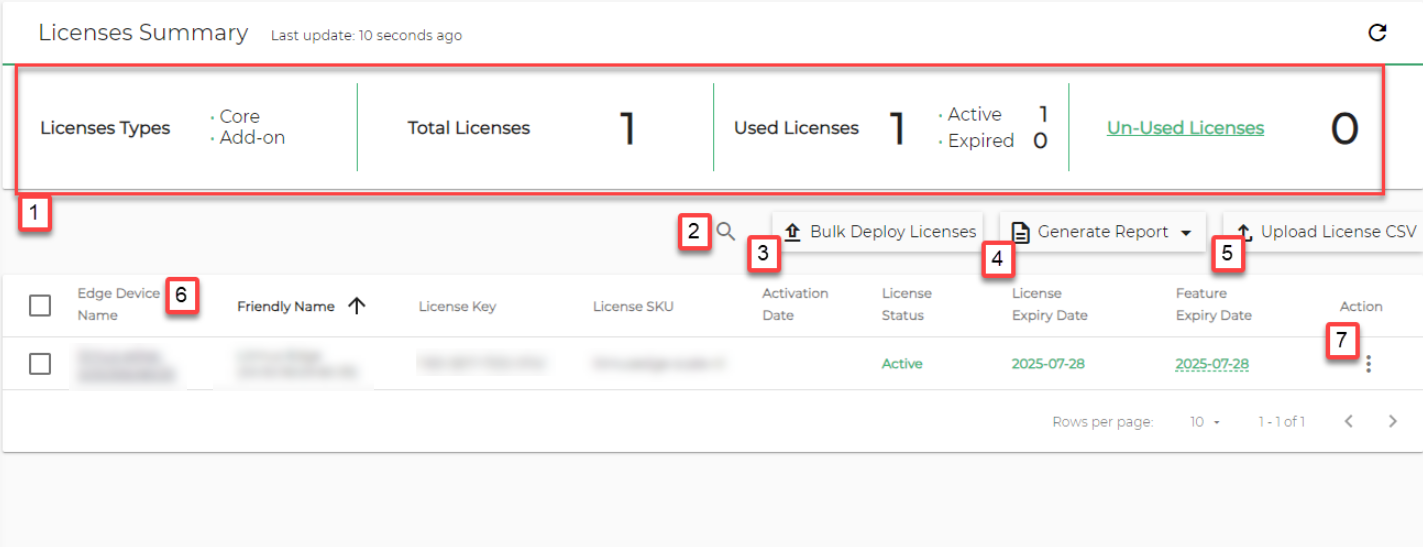
[1] License Usage Statistics
- Licenses Types
- Core
- Add-on
- Total Licenses
- Used Licenses
- Active
- Expired
[2] Filter Refine displayed license data based on specific criteria.
[3] Bulk Deploy Licenses Create summary reports of license usage and statuses to download an use locally.
[4] Generate a Report
Create summary reports of license usage and statuses to download an use locally.
[5] Upload License CSV
Upload license info in CSV format for bulk management.
[6] Edge Device Details
View specific information about associated edge devices.
[7] Action menu:
- Deploy License: See Bulk Deploy Licenses for details.
- Show license features