Certificates
3 min
Note: The Certificates feature is available for Belden Horizon Data Manager 2.20.0 and later.
The Certificates module in Belden Horizon Data Manager allows you to manage SSL certificates on edge devices. This feature includes a comprehensive summary of all your certificates, sorting and filtering options, and the ability to upload or issue a certificate.
Access Certificates UI
To access the Certificates UI:
- Log in to BHDM.
- Select a company. The Projects pane appears.
- Do one of the following:
- Click a project from the Project pane. The Dashboard pane appears for the project.
- Click the Actions icon for a project, and then select View. The Dashboard pane appears for the project.
- From the Navigation panel, select Certificates. The Certificates Management pane appears.
Refer to the following actions you can take on BHDM Certificates Management pane.
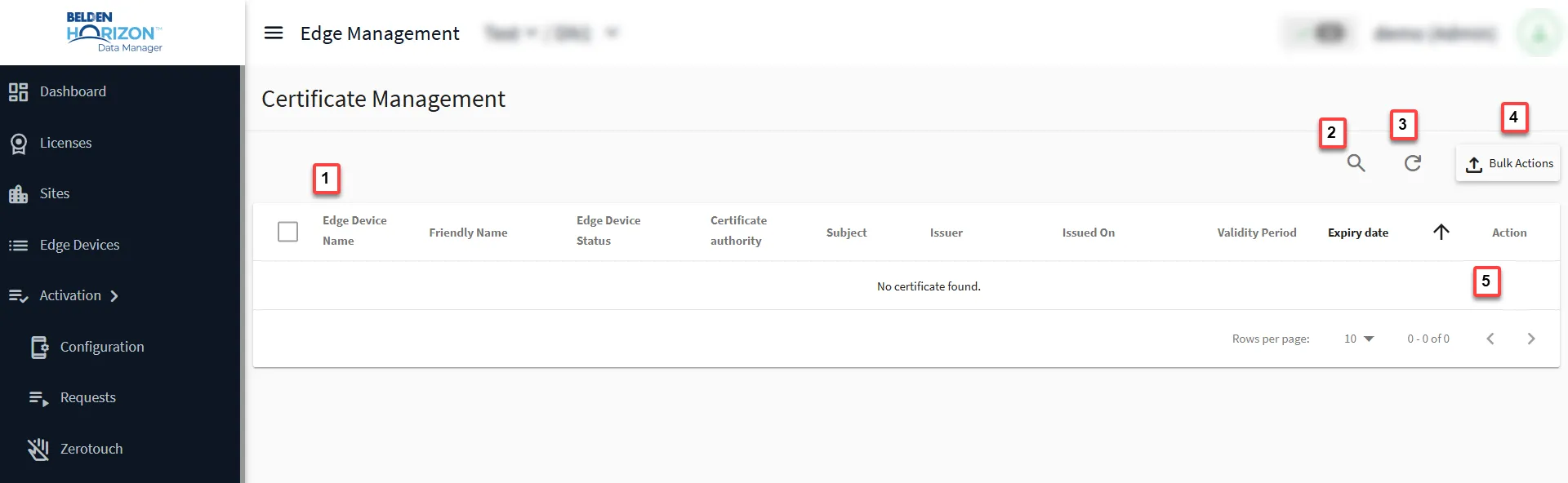
Certificates Management pane
[1] View Edge Devices Statistics
[2] Show filter: Search by Description
[3] Sorting
[4] Bulk Actions
[5] Action
- Issue a new certificate
- Upload a new certificate
- Reset to Edge Default
Next Steps