DigiCert
Note: The DigiCert feature is available for BHDM 2.21.0 and later.
BHDM allows you to centrally manage certificates to ensure encrypted end-to-end communication over TLS (Transport Layer Security). By providing users with the ability to view and control certificates across all active BHDO instances, BHDM facilitates the streamlined management of self-signed certificates directly within the platform.
The DigiCert IoT Trust Manager integration helps users easily manage, renew, and resolve problems with certificate expiration. It also simplifies certificate administration for managing edge devices.
Access DigiCert UI
To access the DigiCert UI:
- Log in to the BHDM Admin Console at the following URL: https://[BHDM IP address]:8446.
- From the Navigation panel, select Integration. Integration's Kafka pane by default appears.
- From Integration's navigation sub-panel, select DigiCert. Integration's DigiCert pane appears.
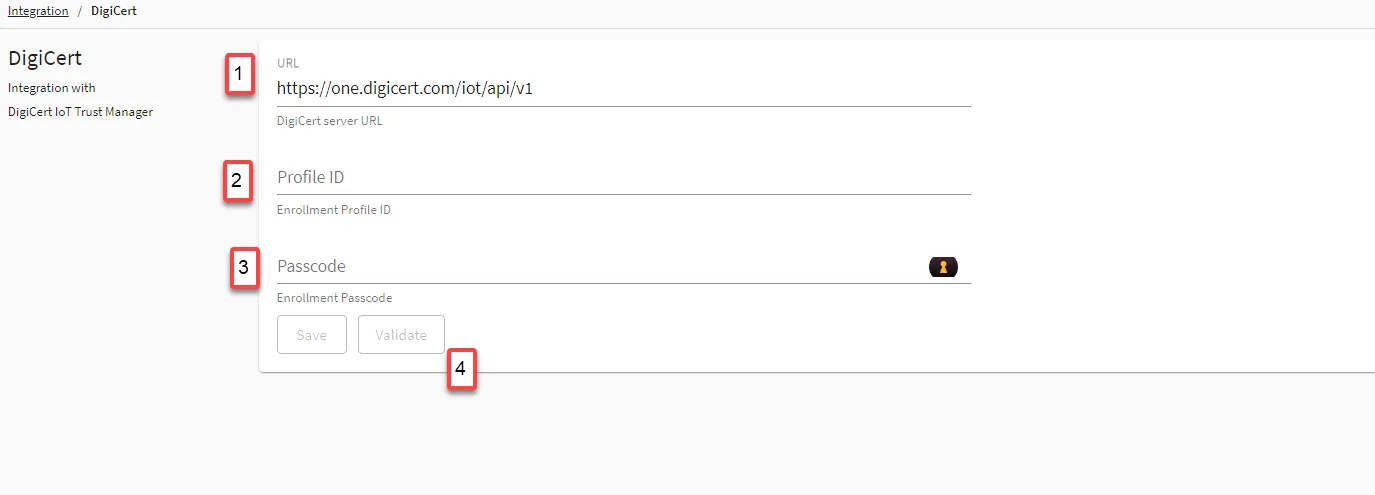
Refer to the following actions you can take on BHDM Admin Console's DigiCert pane.
| |
|---|---|
[1] DigiCert server URL | This parameter is the DigiCert server URL used for communication with the DigiCert IoT Trust Manager. |
[2] Enrollment Profile ID | This parameter is a unique identifier for the Enrollment profile used for authenticating with the DigiCert IoT Trust Manager. |
[3] Enrollment Passcode | This parameter is a one-time generated code used for authentication between the BHDM Admin Console and the DigiCert IoT Trust Manager. |
[4] Validate | Button to validate the DigiCert integration settings and ensure successful communication with DigiCert IoT Trust Manager. |
Note: For more information, please refer to our guide Manage Certificates with DigiCert IoT Trust Manager Integration.