Establish a BHDO-BHDM Connection from Belden Horizon Data Operations
A Belden Horizon Data Operations (BHDO)-Belden Horizon Data Manager (BHDM) connection is a persistent, secure channel between Belden Horizon Data Operations and Belden Horizon Data Manager. It enables centralized remote management of the gateway, including activation, credential provisioning, and forwarding of metrics and events to Belden Horizon Data Manager.
The connection uses two ports for establishment: port 443/TCP for the initial activation handshake and port 51820/UDP for the permanent bi-directional remote access tunnel. An optional third port (8883/TCP) supports ongoing MQTT data transmission after the connection is in place.
Note: For details on the Belden Horizon Data Manager port customization for this connection, see Establishing a BHDO-BHDM Connection from Belden Horizon Data Manager.
Core Components
Component | Role |
|---|---|
Belden Horizon Data Operations | The edge gateway; initiates all connections outbound to Belden Horizon Data Manager |
Belden Horizon Data Manager | The centralized management platform; receives and approves connections |
Port 443/TCP (HTTPS) | Initial activation channel |
Port 51820/UDP (Remote Access) | Permanent bi-directional management tunnel |
Port 8883/TCP (MQTT SSL) | Ongoing metrics and event data transmission (optional) |
Connection Sequence
The following steps describe how Belden Horizon Data Operations initiates and establishes its connection with Belden Horizon Data Manager. From the Belden Horizon Data Operations side, the key actions are entering the activation URL and code (step 1) and confirming the permanent connection after it is established (step 7).
- Belden Horizon Data Operations user enters activation URL and activation code. See Step 2: Create an Activation Request in Belden Horizon Data Operations section of Activate an Edge Device for details.
- Belden Horizon Data Operations attempts to establish an initial connection with inbound port 443/TCP (HTTPS) of Belden Horizon Data Manager.
- Belden Horizon Data Manager receives the connection at its inbound port 443/TCP (HTTPS).
- Belden Horizon Data Operations sends an activation request that is received and approved by Belden Horizon Data Manager. See Step 3: Approve the Activation Request in Belden Horizon Data Manager section of Activate an Edge Device for details.
- Belden Horizon Data Operations sends activation requests on port 443/TCP of Belden Horizon Data Manager.
- Belden Horizon Data Manager user accepts the activation request in UI.
- Belden Horizon Data Manager responds to the activation request with Litmus Remote credentials.
- Belden Horizon Data Operations attempts to establish a permanent connection with inbound port 51820/UDP (Remote Access) of Belden Horizon Data Manager.
- Belden Horizon Data Manager receives the connection at inbound port 51820/UDP (Remote Access).
- Belden Horizon Data Operations confirms the permanent connection with Belden Horizon Data Manager.
- The permanent connection becomes a secure two-way (bi-directional) connection. Both Belden Horizon Data Operations and Belden Horizon Data Manager use Belden Horizon Data Manager's inbound port 51820/UDP (Remote Access) to communicate with each other.
Port Requirements: Belden Horizon Data Operations
Configure the following outbound ports on the Belden Horizon Data Operations gateway:
- Open outbound port 443/TCP to reach Belden Horizon Data Manager (activation).
- Open outbound port 51820/UDP to reach Belden Horizon Data Manager (permanent connection).
- Open outbound port 8883/TCP to reach Belden Horizon Data Manager (MQTT data, if enabled).
Data Transmission: Default MQTT SSL Connector
After a Belden Horizon Data Operations-Belden Horizon Data Manager connection has been established, Belden Horizon Data Manager can receive Metricsmetrics data or Eventsevents data (enable event forwarding separately) from a Belden Horizon Data Operations instance. For Belden Horizon Data Manager to receive the data, the Belden Horizon Data Operations instance must enable its Default Generic MQTT SSL Connector (IntegrationIntegration). After the connector is enabled, the Belden Horizon Data Operations instance attempts to reach a connection at Belden Horizon Data Manager's inbound port 8883/TCP.
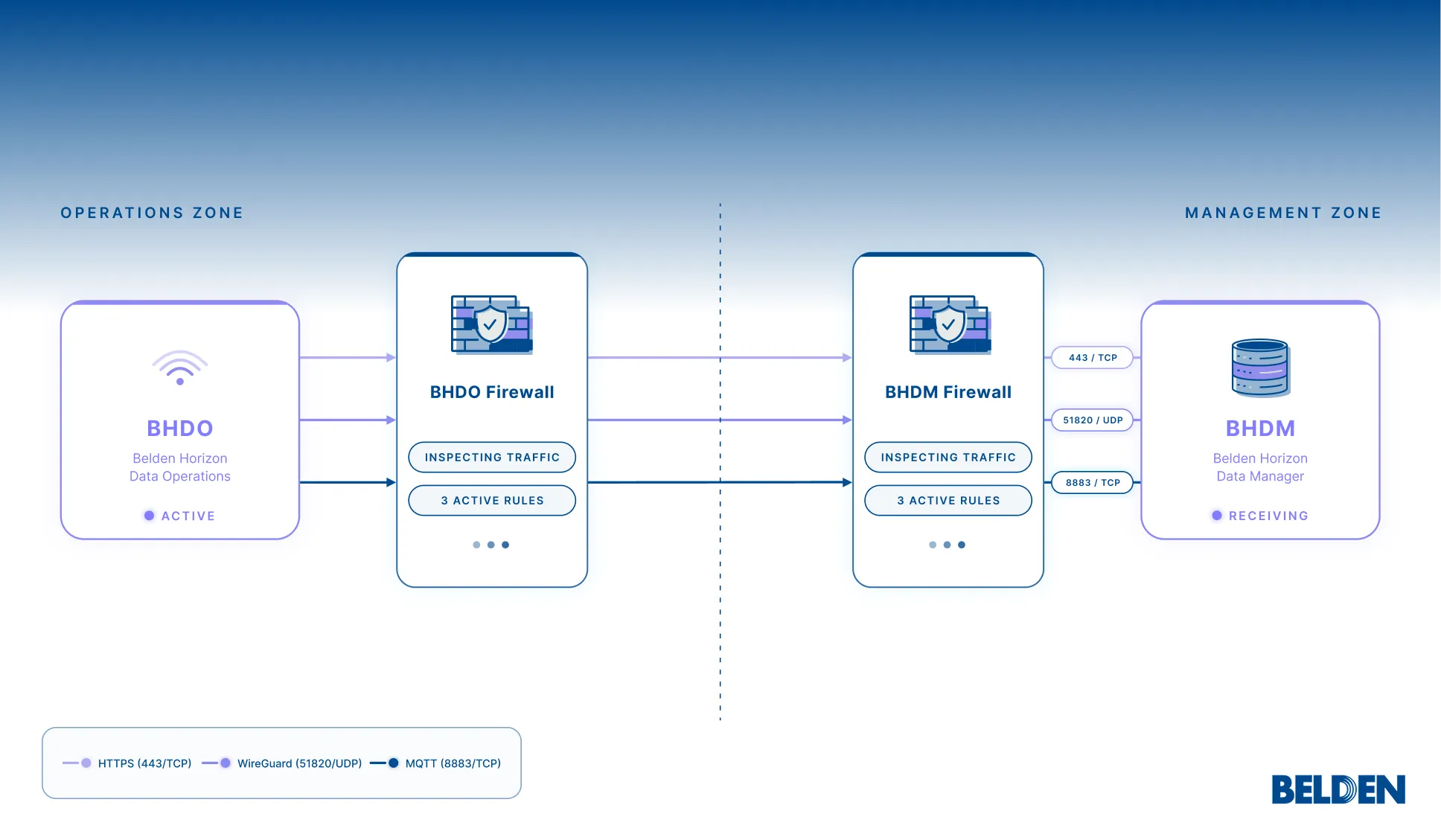
Note: Ports 443 and 51820 are required for establishing the initial connection. Port 8883 is used for ongoing data transmission after the connection is in place. For details about each port, see the Firewall Port Configuration Requirements.
Limitations and Considerations
- Ports 443 and 51820 must be reachable outbound before activation can begin. The connection cannot be established if either port is blocked.
- The MQTT data channel (port 8883) is independent from the management connection and must be explicitly enabled via the Default Generic MQTT SSL Connector.
- Belden Horizon Data Operations does not require any inbound ports for its management connection with Belden Horizon Data Manager.
Related Topics
- IntegrationIntegration