Activate a Node-Locked License Offline
5 min
If your instance of Belden Horizon Data Operations doesn't have an internet connection, you can activate a license offline.
Before You Begin
Before completing the steps below, make sure you do the following:
- Have an Ethernet connection for your first bootup of the Belden Horizon Data Operations device after installation.
- Synchronize the time for the Belden Horizon Data Operations device. See Time Synchronization Issues to learn more.
- Have access to a browser that is connected to the Internet to complete this activation.
- Obtain the license key from your account executive that will be used to activate the license.
- If your Internet browser is on a separate computer, use a text file to copy the Activation Key and Offline Activation Key so you can transport the information.
Activate License Offline
Refer to the appropriate steps depending on if your current license is expired or not.
Activate a License Offline if Your Current License is Not Expired
To activate a license without an Internet connection if your current license is not expired:
- Navigate to System > License. The License pane appears.
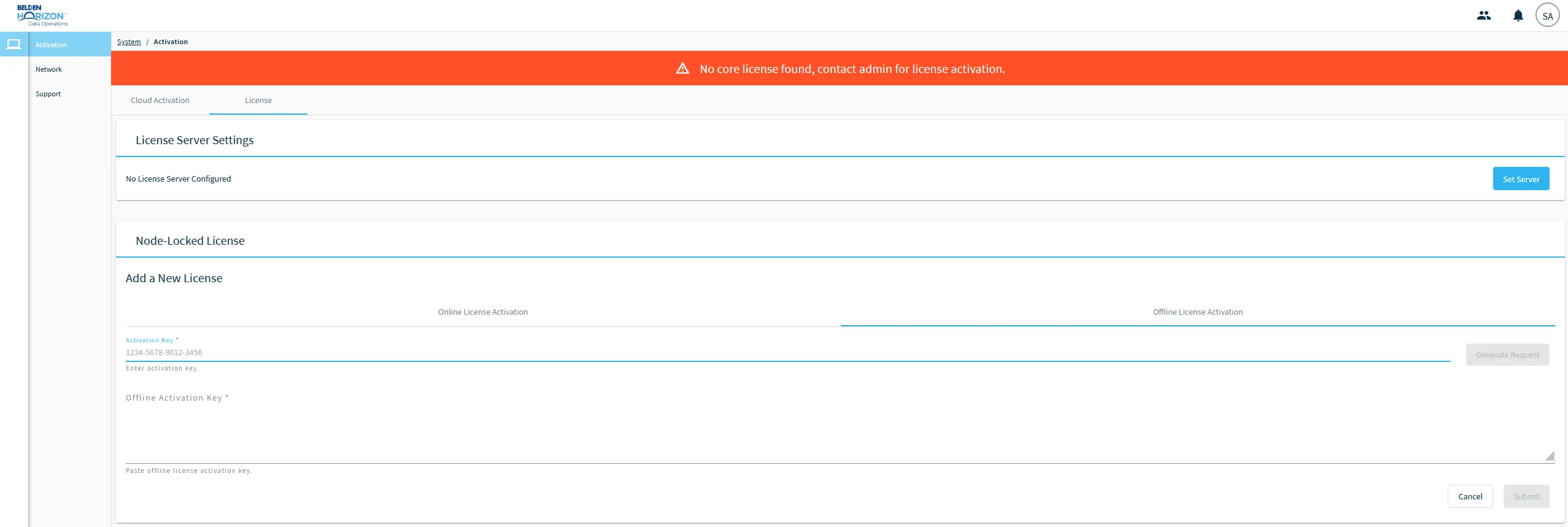
- Click the Offline License Activation tab. The Activation Key and Offline Activation Key fields appear.
- Paste or enter the license key obtained from your account executive in the Activation Key field. Then, click Generate Request. The Offline Activation Request value appears.
- Click the Copy icon for the Offline Activation Request.
- Click Open License Portal. The Licensing Portal opens in a new browser tab.
- In the Activation Request field paste the Offline Activation Request copied in step 5.
- Click the I'm not a robot check box. Then, click Make License.
- Click the Copy icon for the Activation Result.
- Return to the browser tab with Belden Horizon Data Operations and paste the Activation Result in the Offline Activation Key field.
- Click Submit. Your license is now activated.
Activate a License Offline if Your Current License is Expired
To activate a license without an Internet connection if your current license is expired:
- Log in to Belden Horizon Data Operations. The Cloud Activation page appears.
- Click Advanced Options.
- Click the Copy icon for the Offline Activation Request.
- Click Open License Portal. The Licensing Portal opens in a new browser tab.
- In the Activation Request field paste the Offline Activation Request copied in step 5.
- Click the I'm not a robot check box. Then, click Make License.
- Click the Copy icon for the Activation Result.
- Return to the browser tab with Belden Horizon Data Operations and paste the Activation Result in the Offline Activation Key field.
- Click Submit. Your license is now activated.